
Account and billing
Sign-in, plans, billing, team members and licences.
LicensingThe licence terms for each product.Compare plansWhat each plan includes, on the live pricing page.Contact supportBilling and account questions go to a person.
Your account
Plans and billing
Team
Security and legal
Troubleshooting
Most asked
Open Settings
You manage your account, your plan and your team in Settings.
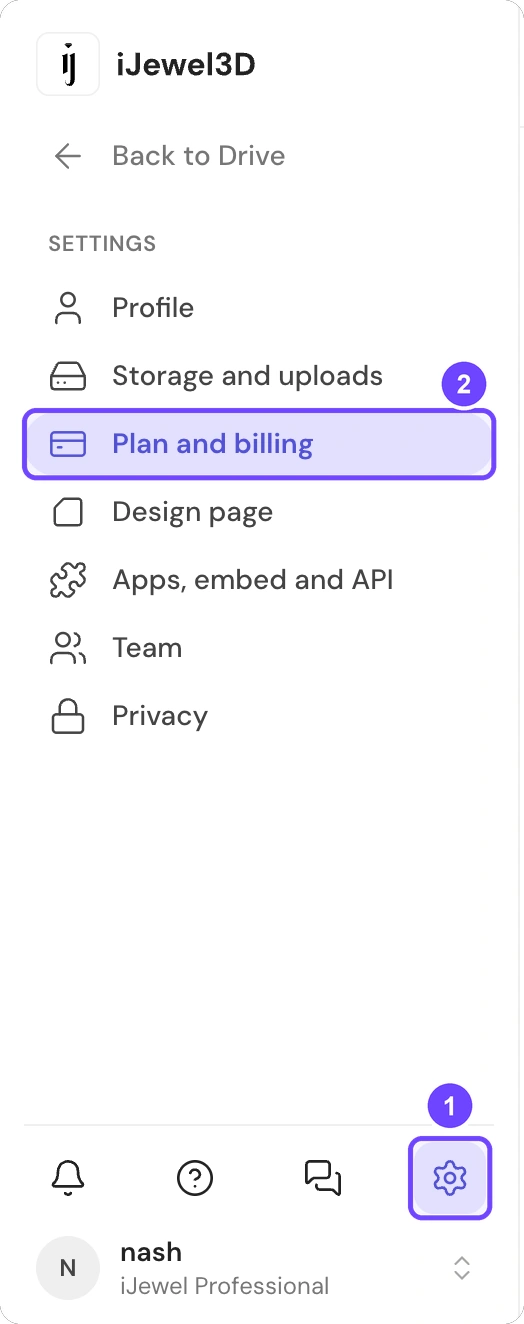
1 Settings · 2 Plan and billing
Step 1 of 3
- Sign in to ijewel3d.com/drive.
- At the bottom of the left sidebar, select Settings (1).
- Select a tab. For your plan and your invoices, select Plan and billing (2).
All 3 steps are done.
The account menu also opens Settings. Select your name at the bottom of the left sidebar. Then select Manage your iJewel account or Plan and billing.
The tabs are Profile, Storage and uploads, Plan and billing, Design page, Apps, embed and API, Team and Privacy. An admin also sees Branding.