
Create an account
Create a free account on the iJewel platform and verify your email address.
An account on the iJewel platform is free. You do not need a payment card for the Free plan.
Before you start
- You need an email address that you can open.
- The password must have 8 characters or more.
- These steps are for the shared platform. For a dedicated instance, read Enterprise instances.
Create the account
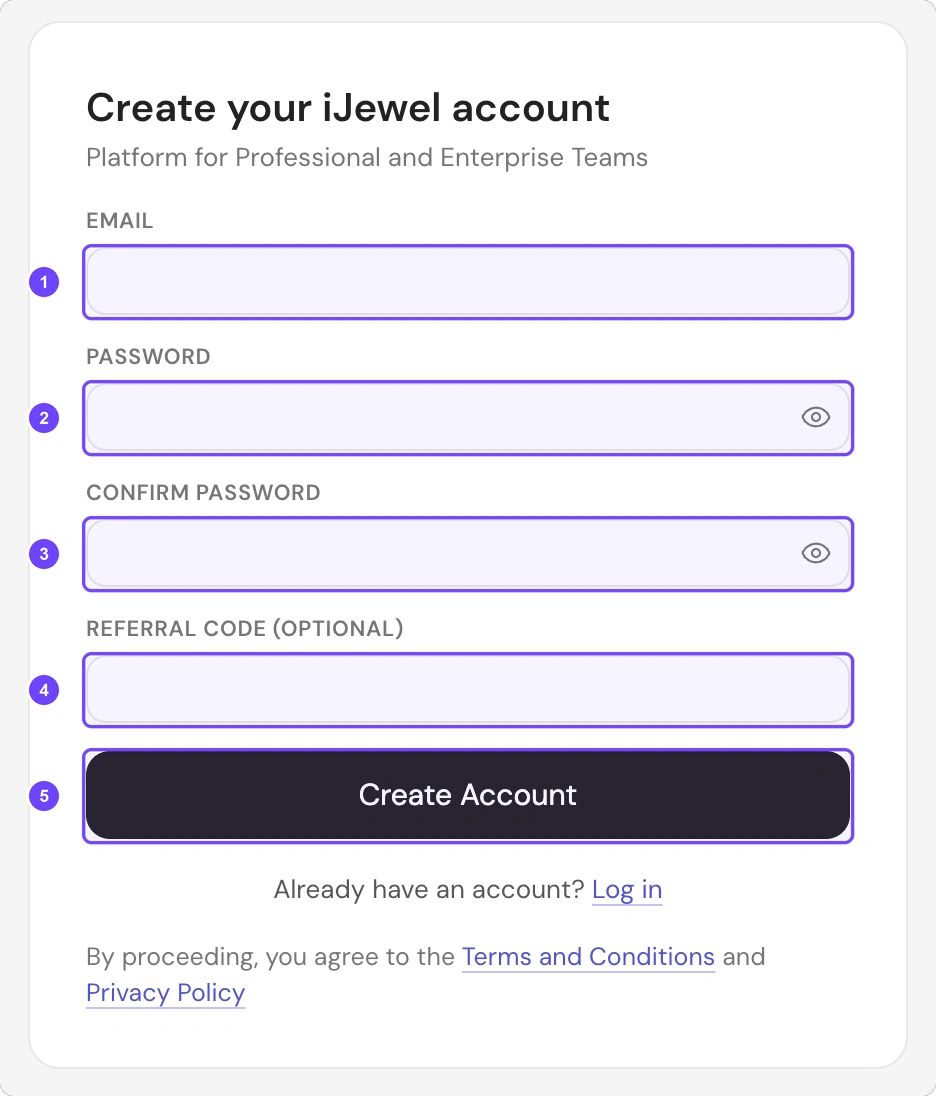
1 Email · 2 Password · 3 Confirm Password · 4 Referral Code (Optional) · 5 Create Account
Step 1 of 6
- Go to ijewel3d.com/drive/signup.
- Enter your email address in Email (1).
- Enter a password in Password (2).
- Enter the same password in Confirm Password (3).
- If you have a referral code, enter it in Referral Code (Optional) (4).
- Select Create Account (5).
All 6 steps are done.
The platform sends a verification link to your email address.
Verify your email
Step 1 of 6
- Open the email from iJewel3D.
- Select Verify Email. The link works for 1 hour.
- Make sure that the page shows Email Verified!.
- Select Continue to Setup.
- Answer the two setup questions. Select Continue after each question.
- On the Plans page, select Skip to stay on the Free plan. To buy a plan, select Upgrade on that plan.
All 6 steps are done.
Verify first, then sign in
If you sign in before you verify, the platform shows the message "Please verify your email to login".
If the email does not arrive
Step 1 of 3
- Look in your spam folder.
- Try to sign in. The platform opens the Check your email page.
- Select Resend Verification Email. You can send a new email after 2 minutes.
All 3 steps are done.
If the page shows Verification Failed, select Send a new link. Then use the link in the newest email.