
Security
How the iJewel platform protects your files, your account and your payments.
Your files are private by default. You decide who sees each file, who can download it and who is in your team.
Your files
| Control | Default | Where you change it |
|---|---|---|
| Who can see a file | Only the owner | The Share dialog of the file |
| Access for one person | None | The People tab of the Share dialog, with Can view or Can edit, then Invite |
| Public link | Restricted | Who can open the links on the Link tab, set to Anyone with the link |
| Download | Off | The Allow download switch on the Link tab |
| Model protection | Included in every plan | Protect on upload on the Privacy tab in Settings. See Protected files |
Before the platform permits downloads, you must confirm this statement: "I own this model and I have the rights to distribute it."
An organization with a dedicated enterprise instance can turn off public links for all its users.
Your account
- A password must have 8 characters or more.
- You must verify your email address before you can sign in.
- You can change your password in Settings, on the Profile tab, in the Password card.
- Google sign-in is available on the shared platform.
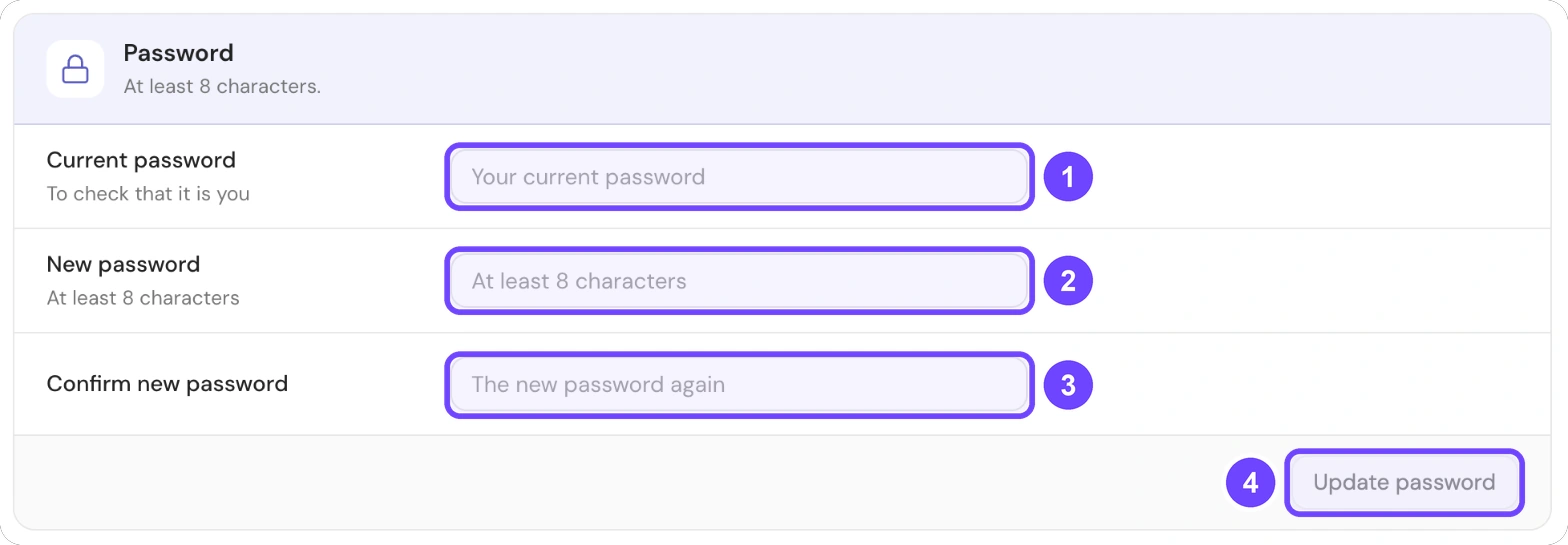
1 Current password · 2 New password · 3 Confirm new password · 4 Update password
For the steps, see Reset your password.
Your team
On an organization plan, an admin gives each member a role and a folder. A guest has no access. See Roles.
Your payments
- Your card details go directly to the payment provider.
- iJewel3D does not store card details on its servers.
- A payment can use 3D Secure when your bank asks for it.