
I paid, but my plan is still Free
What to check when a payment does not change your plan, and what to send to support.
Symptom
You paid for a plan. The Plan and billing tab in Settings still shows iJewel Free on the plan card, or paid features stay locked.
Cause
The platform changes your plan when it gets the confirmation of your subscription. These are the usual causes:
- The confirmation is late.
- You paid with a different email address from the email address of your account.
- You are signed in to a different account.
- The payment is not complete.
- You have an iJewel Design plan and a platform plan. In that case, the platform plan stays on purpose.
Fix
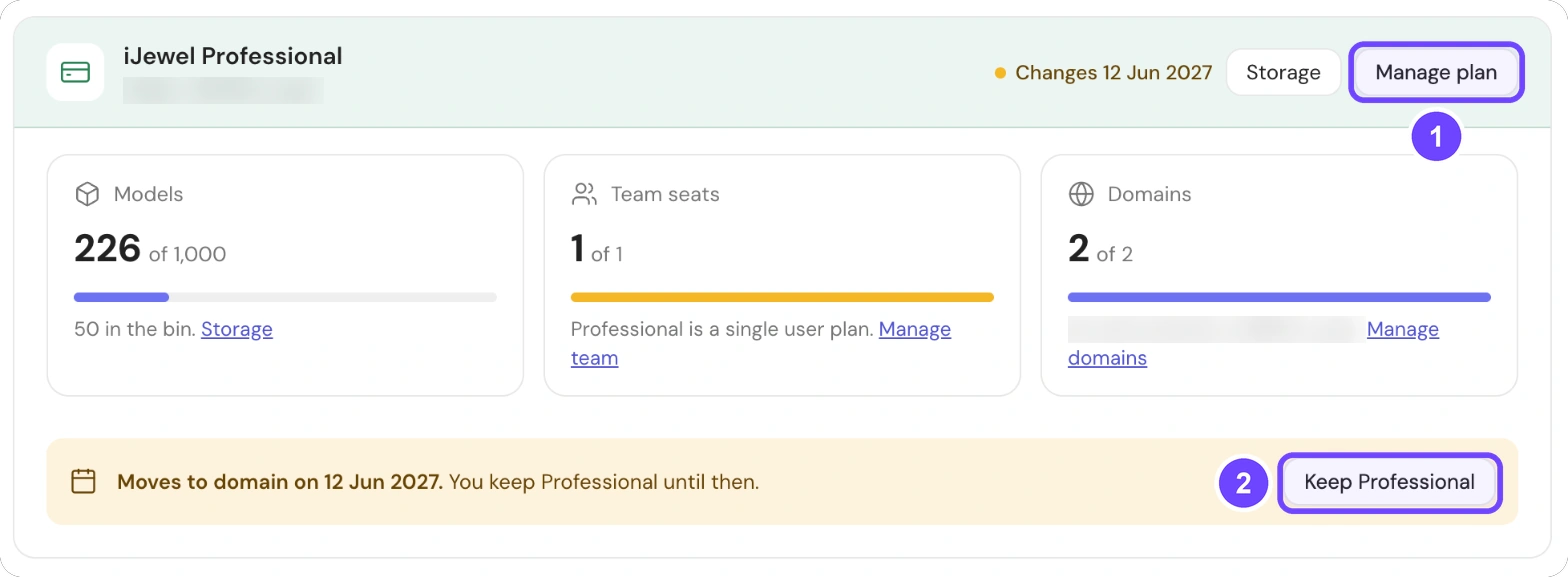
1 Manage plan · 2 Keep Professional (shows when a change is scheduled)
Step 1 of 5
- Select Settings at the bottom of the left sidebar. Then select Plan and billing again. The page reads your plan again.
- Sign out, then sign in again.
- Make sure that the account email is the same as the email on your receipt.
- In Payment history, make sure that the Status of the payment is Paid.
- If you use iJewel Design, read iJewel Design and platform accounts.
All 5 steps are done.
Do not pay a second time
Do not buy the plan again. Send the details to support instead.
If the problem continues
Contact support and send these details:
- The email address of your account.
- The email address that you used for the payment.
- The plan name and the date of the payment.
- The invoice or the receipt as a PDF. See Invoices.
A person on the support team checks your subscription.